What TestWatch does
Everything below is shown with real output from the open-source demo shop, not mock-ups.
Does TestWatch work with 2FA logins?
Passwords, authenticator-app 2FA, and codes or links sent by email.
Save a test account once (username, password and the 2FA secret); every test on the app can use it, with a different account per environment if you need one. The 2FA code is computed at run time. Emailed codes, verify links, magic links and password resets arrive in a built-in test inbox. Secrets are encrypted at rest and scrubbed from stored evidence. SMS codes aren’t supported.
await page.getByRole('button', { name: 'Sign in' }).click();
await page.getByRole('textbox', { name: 'Authentication code' }).fill(otp());
await page.getByRole('button', { name: 'Verify' }).click();
How often can tests run, and who gets told?
Daily on Free, hourly on Starter and as often as every 15 minutes on Team. Failures email the owner on every plan; Slack and email channels on paid plans.
Pick a preset or write a cron expression. A failed run shows the failing step, screenshots, console and network logs and a diagnosis, and the alert links straight to it.
Checkout with 2FA sign-inFailed
Failing step: Verify order confirmation and total
Expected $21.00, received $16.00
A real failed run on the demo shop after we broke its cart total.
Four browser profiles from one description
Desktop and mobile Chrome, mobile and desktop Safari, emulated.
Each browser profile of a flow is its own test, so a checkout checked on desktop Chrome and on mobile Safari is two tests. Free and Starter test one profile per flow; Team and up, all four.
- Desktop ChromeSupported
- Mobile Chrome (Pixel 7)Supported
- Mobile Safari (iPhone 13)Supported
- Desktop SafariSupported
Tells you why it failed
A UI change, a real bug, an outage, a CAPTCHA or a bad login: every failure gets a call.
When it can’t test something, it says so and the test takes no slot. When a failure isn’t a UI change, it doesn’t “fix” the test; it asks you.
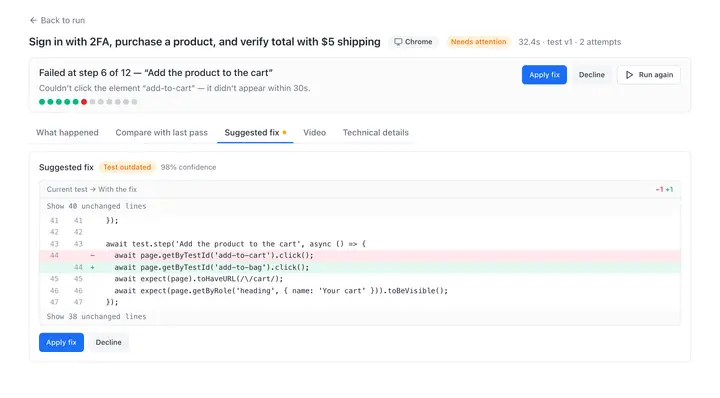
A button was renamedFix proposed
The page changed, not the app’s behaviour
The cart total was wrongFailed
Not a UI change. Needs your decision
The contact formBlocked
The app blocked automated access (CAPTCHA / WAF). Not a problem with your test.
You approve every fix
When the page changes, it proposes a new locator or wait. Assertions in your main tests are never touched.
Fixes show as a diff on the failed result and wait in your Review inbox; they apply only when you approve them, so a test can’t quietly start passing on a broken page.
Can I keep my tests if I leave?
Every test is plain Playwright with named steps. Copy one, or export the whole suite.
No proprietary format. On every plan, export the suite as a runnable Playwright project and run it with npx playwright test. Tests that read a test inbox need an adapter for your own email provider.
await test.step('Open the Waterproof Notebook and add one to the cart', async () => {
await page.getByRole('link', { name: 'Waterproof Notebook' }).click();
await page.getByTestId('add-to-cart').click();
await expect(page.getByRole('link', { name: 'Check out' })).toBeVisible();
});
Does TestWatch run in CI?
TestWatch runs from your pipeline through the GitHub Action testwatch-dev/action or the CLI @testwatch/cli. Runs from CI, the API, deploy hooks, preview URLs and webhooks need Starter or higher.
- GitHub Action and CLI
The GitHub Action testwatch-dev/action and the CLI @testwatch/cli start a run from your pipeline, wait for the verdict, and fail the job when it finds a bug or a failure that needs your call. The CLI works in any CI. GitHub Action docs
- REST API
Start runs, read verdicts and cancel runs with a workspace API key. Keys can be read-only and pinned to one app. API docs
- JUnit reports
Download any run as JUnit XML from the dashboard on every plan, or have the CLI write it for your CI’s test report (Starter and up). CLI docs
- Deploy hooks and webhooks
A signed deploy hook starts a run after each deploy (generic or Netlify). Signed outbound webhooks send results to your own systems. Hooks and webhooks
- Preview URLs
Run the suite against a pull request’s preview deploy. Staging behind a password, custom headers, Vercel protection or Cloudflare Access works on every plan. Preview URLs and protected staging
More
- Test inboxes and test data
Each run gets its own email inbox for verify links, magic links, resets and emailed codes, and unique names and emails tagged with the run, so your cleanup hook can remove them. Every plan. Fixtures docs
- Export
Download the whole suite as a runnable Playwright project, with fixtures, config and a CI workflow. Every plan. Export docs
- Files
Tests can upload files you attach and check files the app lets you download.
- Teams
Owner, Admin and Member roles. Unlimited teammates on every plan; no per-seat price.
- Security
Credentials encrypted at rest, evidence scrubbed, servers in Vienna. What is and isn’t in place
Start freeSee a real test end to end
Free: 5 tests, 500 runs a month, 2 apps and one daily schedule. Unlimited teammates, no card.