Self-healing tests, without the silent part
A test that repairs itself without asking can also “repair” its way past a real bug. TestWatch proposes the fix and you decide.
The rules a fix follows
- It changes how an element is found (the locator) or how long to wait. Not what the test checks.
- It applies only after someone on your team approves it in the Review inbox.
- If the failure isn’t a page change, there is no fix: you get a reason instead (a real bug, the app being down, a CAPTCHA or a broken login).
What “self-healing” usually means
In most testing tools, self-healing happens while the test runs. The tool keeps a list of fallback locators for each element, or a fingerprint of it (its text, attributes, position in the page). When the main locator stops matching, it picks whichever element on the page looks most similar and carries on. The run goes green and, at best, a log line mentions that a different element was used.
That works well for the common case: a button got a new class name or moved into another container. The trouble is the uncommon case. A similarity match can’t tell “the same button, renamed” from “a different button that happens to look alike”. If the real “Place order” button is gone because a deploy broke the checkout, a fallback may click something else, and the run still reports a pass. The test was meant to find exactly that failure.
TestWatch does it the other way round. The run itself stays plain Playwright: no fallback lists and no guessing while it runs. When a run fails, the failure is triaged, and if the page changed, an AI agent proposes a change to the test code. You read it as a diff and approve it or not.
Playwright’s healer agent
Playwright ships its own repair step. Playwright Test Agents are three agents, the planner, generator, and healer, that you add to your repo with npx playwright init-agents --loop=vscode|claude|codex|opencode and drive from VS Code, Claude Code, Codex, or opencode. The healer runs the suite and repairs failing tests; its docs say the result is a passing test, or a skipped test when it believes the functionality is broken. It edits the test files in your repo, and you review those edits like any other change.
That is a good fit when an engineer already owns the suite and its CI. The difference with TestWatch is who runs the loop and what a fix may touch. Here every failed run gets a verdict first (page changed, real bug, app down, login problem), a fix may change only locators and waits, not what the test checks, and it waits in the Review inbox for your approval. The one exception is a fix you already accepted on a pull-request preview. A fix never skips a test to turn a run green. The full comparison covers setup, cost and CI.
A real one
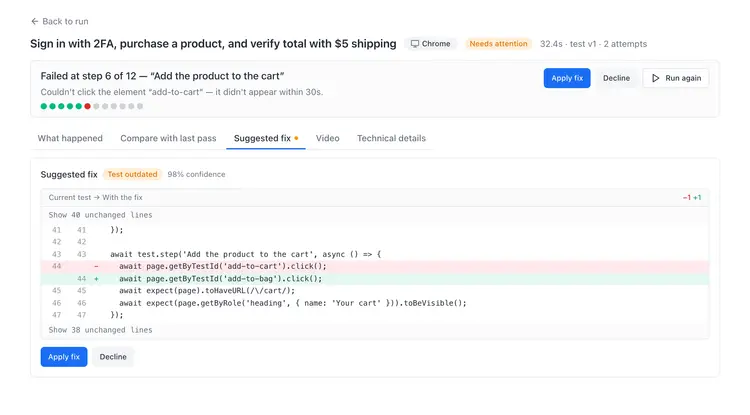
We renamed the demo shop’s “Add to cart” button and its test id. TestWatch’s verdict: “The page changed, not the app’s behaviour”. The proposed fix, approved by a person:
await page.getByTestId('add-to-cart').click();
await page.getByTestId('add-to-bag').click();
From a real run on the demo shop, 3 October 2026. Unedited.
On the failed result, a proposed fix looks like this, waiting for someone to apply or decline it:
What a fix may change
The diff above is the whole fix: one locator. That is the normal size. A fix may update locators and waits. It may not change what an assertion checks: no new expected value, no different matcher, no loosened or removed expect(…). An assertion is the test’s statement of what should happen, and changing it to turn a red run green is how bugs get hidden. The one thing a check may follow is a renamed test id on an element that must still exist. This is checked in code before a fix is stored, not left to the AI’s judgement: a change that alters a check can’t be applied as a fix, and the failure goes to you as a decision instead.
Nothing is applied on its own. A proposed fix waits in the Review inbox with the failing step, a screenshot and the diff. When you apply it, it becomes a new version of the test, and the earlier versions stay in the test’s history.
How a failure is classified
Before anything is proposed, the failed run gets a verdict. These are the ones you can see:
- The page changed. The element still exists, it’s just found differently now. This is the only verdict that comes with a code fix.
- Real bug. The test found the element and did the action, but the result was wrong. There is no fix to approve; the test did its job.
- The flow changed. The page now asks for something the test never did, like a new step. That needs the test written again, so you get a Regenerate button instead of a diff.
- Needs your decision. The evidence doesn’t clearly point one way, so nothing is proposed. When we broke the demo shop’s shipping charge, the total check failed (Expected: "$21.00", Received: "$16.00") and the verdict was “Not a UI change. Needs your decision”: no fix offered, the call left to a person.
- Flaky. It failed once and passed when run again. You see both attempts on the result. It is kept out of the inbox.
- Blocked. A CAPTCHA or bot wall stopped the run. Not a problem with your test, and we don’t try to get past it.
- Login unavailable. The login asked for a code the test account can’t produce, such as a 2FA code with no secret saved, so the run stopped at the login.
- App down. Your app didn’t respond, so the run stops instead of failing every test one by one.
When TestWatch is writing a new test, the same walls stop it early with a named reason, including wrong credentials and a missing 2FA secret.
Fixes on pull-request previews
On Starter and above you can run your tests against a pull request’s preview deploy. If a preview run fails because the PR changed the page, the proposed fix can be accepted for that PR only: later preview runs on the same branch use it, and your main test stays as it was.
On a preview, a fix may also update the text a check expects when the PR deliberately renamed it, say “Register” to “Sign up”. It can’t change what kind of check it is or remove one, and you confirm that change when you accept it.
When the PR ships and the main test fails the same way, the accepted fix is tried against your main app first. If it passes twice there, it’s applied to the main test, you get a notice, and you can undo it. This is the one case where a fix is applied without a second click, and only because someone already accepted it on the PR. Preview URLs and protected staging
When to reject a proposed fix
Most fixes are a locator that followed a renamed button. Reject, or open the test instead, when:
- the new locator points at a different thing than the step’s title describes, like “Delete” where the step says “Save”;
- the element moved somewhere a user wouldn’t find it, such as behind a menu that wasn’t there before: that may be a real usability regression;
- the change wasn’t meant to ship: if nobody renamed that button on purpose, the drift itself is the news;
- the fix only lengthens a wait on a page that got slow: approve it if slower is acceptable, otherwise treat the slowness as the bug;
- the same test needs a fix every week: the locator is probably too tied to layout, and regenerating the test is the better repair.
Rejecting costs nothing. The test keeps its current code, and the next failure is triaged again.
Passing runs make no AI calls
A passing run is plain Playwright code in our browsers. AI is used only when a run fails: the failure’s scrubbed error text and a page snapshot go to AI models to classify it and, if the page changed, to propose the fix. A suite that stays green costs no AI at all, which is why plans price tests and include the runs.
Why not heal automatically?
Because the same failure can mean two things. A button that moved is a test problem; a button that disappeared because the feature broke is your bug. A tool that always “heals” doesn’t tell you which one happened. Asking costs you one click; not asking can cost you a broken checkout that every test calls green.
Related
- How the AI Playwright test generator works
- The checkout flow behind this example
- Docs: preview URLs and PR fixes
Free: 5 tests, 500 runs a month, 2 apps and one daily schedule. Unlimited teammates, no card.