An AI Playwright test generator that keeps the test running
Describe a user flow in plain English. TestWatch explores your app, writes a Playwright test, checks that it passes, and then runs it for you on a schedule or from CI.
Three ways to get a Playwright test today
Record it with codegen. npx playwright codegen opens a browser and writes code as you click. It prefers role, text and test id locators, and you can add visibility, text and value assertions from its toolbar while recording (Playwright docs). It is free and fast for a flow you can click through once. What you get is what you did: the checks are the ones you remembered to add, and a login with a changing 2FA code has to be handled by hand afterwards.
Use Playwright’s own AI tooling. Playwright ships three Test Agents: a planner that explores the app and writes a Markdown test plan, a generator that turns the plan into test files and verifies selectors and assertions live, and a healer that runs the suite and repairs failing tests (Playwright docs). You set them up in your repo with npx playwright init-agents and drive them from a coding assistant such as VS Code, Claude Code, Codex or opencode. The Playwright MCP server is the related building block: it lets any MCP-capable assistant drive a browser. Playwright itself is open source (Apache-2.0), and this tooling runs in your repo, with the AI model of the assistant you bring. Running the tests on a schedule, reading failures and deciding what to do about them stays with you.
Use a hosted service. This is what TestWatch is: you write the request, it writes the test, and it keeps running it. When a run fails you get a reason, and when the page changed you get a proposed fix you approve. You pay for the service instead of for your own time on upkeep. We compare it with the Test Agents in detail on TestWatch vs Playwright Test Agents.
None of these is wrong. If someone on your team will own the suite, the free tools are a good choice. If nobody will, a test that nobody runs isn’t worth generating.
What TestWatch generates
This is a real test, written by TestWatch for the open-source demo shop, from this request:
- The request
Sign in as the 2FA shopper: username and password, then the 6-digit authenticator code.
Open the Waterproof Notebook and add one to the cart.
Check out: fill in a shipping address and pay with the test card 4242 4242 4242 4242, any future expiry date and CVC 123.
Check the order confirmation says the order was placed and the total is $21.00 (the $16.00 notebook plus $5.00 shipping).
While the agent works, the generation page shows each step it takes. Here is a later generation on the same shop, captured while it ran:
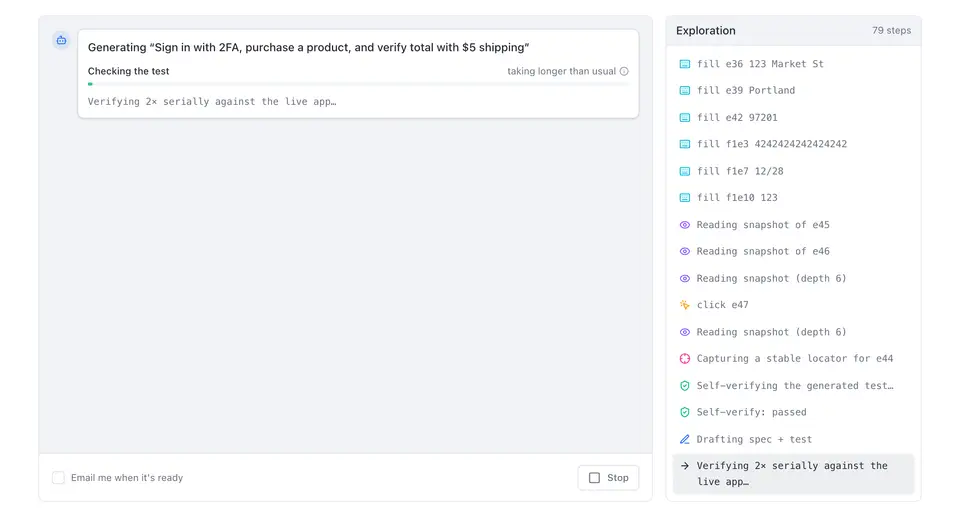
The start of the test it wrote, with its real line numbers:
import { test, expect, otp } from '../fixtures';
test('Checkout with 2FA sign-in', async ({ page }) => {
await test.step('Sign in as the 2FA shopper', async () => {
await page.getByRole('link', { name: 'Sign in' }).click();
await page.getByRole('textbox', { name: 'Username' }).fill(process.env.TARGET_EMAIL!);
await page.getByRole('textbox', { name: 'Password' }).fill(process.env.TARGET_PASSWORD!);
await page.getByRole('button', { name: 'Sign in' }).click();
await page.getByRole('textbox', { name: 'Authentication code' }).fill(otp());
await page.getByRole('button', { name: 'Verify' }).click();
await expect(page.getByRole('button', { name: 'Sign out' })).toBeVisible();
});
await test.step('Open the Waterproof Notebook and add one to the cart', async () => {
await page.getByRole('link', { name: 'Waterproof Notebook' }).click();
await page.getByTestId('add-to-cart').click();
await expect(page.getByRole('link', { name: 'Check out' })).toBeVisible();
});
And the step that checks the outcome:
await test.step('Verify order confirmation and total', async () => {
await expect(page.getByText('Thanks! Your order has been placed.')).toBeVisible();
await expect(page.getByTestId('order-total')).toHaveText('$21.00');
});
From checkout-with-2fa-sign-in.spec.ts, generated 3 October 2026. Unedited. The whole file is on How it works.
How generation works
An AI agent opens your app in a real browser, logged in with a test account if the flow needs one, and works through the request step by step. It reads the page’s accessibility tree, so the locators it writes are the ones a user would recognise: a role and a name, a label, or a test id.
Then it writes the test and has to run it before it may hand it in. The submitted code then goes through checks in code, not in the prompt:
- it is a real test with real assertions, not a placeholder;
- a multi-step flow has a
test.stepfor each step, and isn’t a trivial test for a long flow; - its locators were seen on the page, not guessed;
- the login isn’t made optional, so a broken login can’t be skipped quietly.
A test that passes these is run again, separately, and is marked ready only if those runs pass. If it fails, the agent gets one repair attempt with the real error. A final check asks whether the assertions verify what the request asked for; if part of it isn’t checked, the test gets one stronger rewrite, and you see a note naming what still isn’t checked.
When a flow can’t be tested, it stops early and says why: a CAPTCHA or bot wall, the app being down, wrong credentials, a 2FA code without a saved secret, or an email that never arrived.
What the generated code looks like
It is standard @playwright/test. Each step of your request becomes a test.step with a readable title, which is also what the run report shows. Logins read the test account from environment variables, and 2FA codes come from otp(), computed at run time from the secret you saved. Emails go to a built-in test inbox through inbox().
Those helpers come from a small fixtures file. You can copy any test, or export the whole suite as a Playwright project that runs with npx playwright test on your own machine or CI. Every plan includes export. Tests that use the inbox need an adapter for your own email provider once exported.
Honest numbers
We measure generation on our own fixture apps. In the last eval (87 trials, October 2026), 94% of generations ended well: a correct test, or a correct explanation of why the flow can’t be tested, such as a bug it found. 1% were false green: the test passed when it should have failed. 0% were brittle: they broke on a harmless change. 5% failed to produce a test, and 0% stopped on a blocker that wasn’t real (shares are rounded). See how we measure, with every case and trial.
Fixture apps are not your app, and 1% false green is not zero. That is why every generated test is shown to you as code with its steps before you rely on it, and why a passing run should be read as “this flow worked”, not as proof the test covers everything.
Limits
- Web apps only, in 4 emulated browser profiles: desktop and mobile Chrome, mobile and desktop Safari. No Firefox, no real devices, no native apps.
- No SMS codes, and no signing in through Google, GitHub or SSO in the app under test.
- No CAPTCHA bypass: a bot wall stops the test with that reason.
- Running from CI, deploy hooks and preview URLs need Starter or above.
- Generating a test takes minutes, not seconds: the agent explores the app and runs the test before it’s ready.
What it costs to run
AI is used to write a test and to explain a failure. A passing run is plain Playwright and makes no AI calls, so plans price tests and include the runs. See pricing.
Related
- Self-healing Playwright tests you approve
- Example: test a checkout flow
- Example: test email verification
- Docs: run tests from CI
Free: 5 tests, 500 runs a month, 2 apps and one daily schedule. Unlimited teammates, no card.